Translate - Translator
- 4.7
- Rating
- 10.00M
- Installs
- Free
- Price
 Analysis by App-foxy
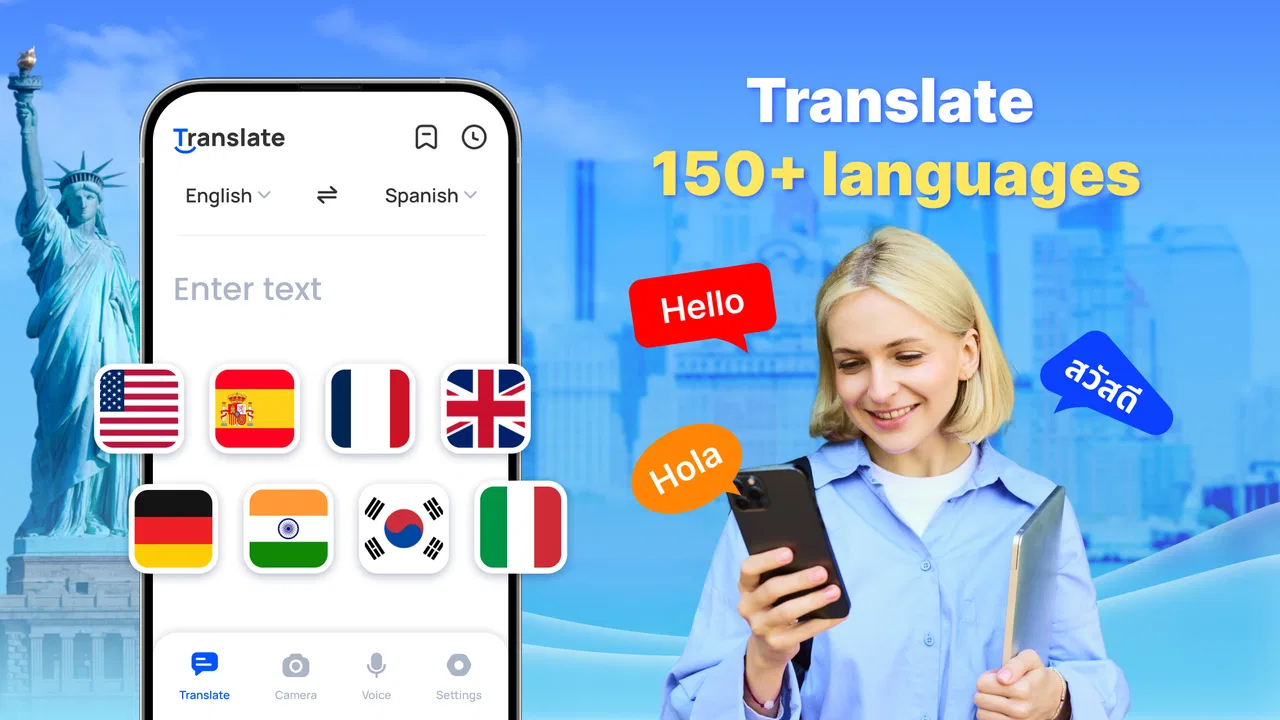
I usually judge a translation app twice: first when I am impressed by how quickly it handles a phrase, and again after the novelty has disappeared. Translate - Translator makes a strong first impression because it brings text, voice, and photo translation into one productivity app instead of making me switch between separate tools. Its appeal is practical rather than flashy: when I need to understand a sign, compose a short message, or check a spoken sentence, I can reach for the same place each time.
The app is free to download, aimed at Everyone, and developed by ZANKHANA PTE LTD. It has built a sizeable audience, with over ten million installs and an average rating of 4.6 from around thirty-two thousand ratings. Those figures suggest that it is not merely a curiosity people try once. Still, popularity does not automatically mean it deserves a permanent place on every phone, so I focused on the situations in which it keeps earning that space.
From quick first-week helper to everyday language tool
During the first week, the biggest benefit is convenience. I can paste written text, speak a sentence, or use a photo when typing is awkward. That range matters in real life. A traveler looking at a menu does not want to transcribe every line manually, while someone trying to ask for directions may prefer speaking instead of hunting for the right keyboard. Having these routes together makes the app feel more useful than a basic text-only translator.
You May Also Like

 Blood Strike: 2.5 Anniversary
Blood Strike’s Loadouts Turn Every Drop Into a Tactical Gamble
A close look at Blood Strike’s custom loadouts: how fast access to signature weapons reshapes its battle royale rhythm, rewards preparation, and narrows the gap between fights.

 Pandora - Music & Podcasts
Pandora’s Music Is Easy to Start, but Harder to Recover
Pandora’s strength is its low-effort path from a seed to a station. Its weak spot is how much confidence it asks you to place in connection, setup, and quiet recovery.

 8 Ball Pool
 Is Built on Rivalries, Rematches, and Routine
A close look at the rivalries, rematches, shared routines, and unanswered safety questions that turn a quick pool match into a persistent mobile community.

 Samsung Music
’s Quiet Strength Is Playing What You Already Own
Its reach comes less from spectacle than from dependable access to a personal library. That simplicity is both the app’s strongest retention engine and its ceiling.

 AccuWeather: Weather Radar
AccuWeather Review: A Quick, Clear Forecast for Everyday Decisions
For everyday plans, the best forecast is the one you can understand quickly. AccuWeather makes rain timing, radar, and local conditions easy to act on, with a few trade-offs.

 Hill Climb Racing
Why Hill Climb Racing Still Turns Crashes Into One More Run
A tiny car, a bumpy hill and one more upgrade: Hill Climb Racing keeps resurfacing because its simple chaos makes every near-miss feel personal.
More From Our News Desk



The photo option is especially valuable for short bursts of information. I would use it for a notice, label, receipt, or menu where the original language is unfamiliar and copying the words would be slow. The sensible workflow is to treat the result as a quick understanding aid first, not as a polished translation for publication. Images can contain unusual layouts, decorative fonts, handwriting, or several languages at once, and those conditions naturally make any camera-based translator less dependable.
Voice translation serves a different purpose. It is helpful when I need to get the general meaning of a spoken sentence without typing it. In a quiet, direct exchange, that can remove a lot of friction. The practical tip is to speak in short sentences and pause between ideas. Long, hurried speech gives an automated translator more opportunities to misread names, numbers, slang, or sentence boundaries. I would also repeat important details in writing before acting on them.
The app supports more than one hundred and fifty languages, which gives it a broad reach for travel, study, family conversations, and occasional work tasks. That breadth is useful, but it should not be confused with identical quality in every language pair. Common languages and straightforward sentences are usually the safest place to rely on an automated result. For an important legal, medical, academic, or professional document, I would still ask a fluent person to review the wording.
One of the most useful first-week habits is separating “understanding” from “sending.” I might use the app to understand a message immediately, then rewrite my reply in simpler language before translating it back. Translating the back-translation is not proof that the sentence is perfect, but it can reveal an obvious misunderstanding or an accidental change in tone. This small check is more valuable than blindly copying the first result into a sensitive conversation.
Offline translation is another reason the app can feel reassuring at the beginning. A connection is not always dependable in an airport, on a train, or while walking through an unfamiliar area. I would prepare before leaving rather than assume every language will automatically be ready without internet access. The important point is that offline capability is most useful when treated as part of trip preparation: test the languages and the type of translation you expect to need before you are standing in front of a sign with no signal.
Speed also shapes the first impression. For simple requests, a fast result keeps the conversation moving and makes the app feel less like a technical tool. That does not mean speed should replace checking. A rapid translation of a short phrase is convenient; a rapid but slightly wrong translation of a dosage instruction or booking condition can be dangerous. I see the app as a fast first layer of comprehension, with human judgment still responsible for high-consequence decisions.
Where it fits better than the usual alternatives
The usual alternative is a browser-based translator, and that option remains perfectly adequate when I am already working at a computer or need to compare several versions of a long passage. A dedicated app is more comfortable for camera and voice tasks, though. It is also easier to use in a spontaneous moment because I do not have to open a browser, find the right page, and arrange the screen for a photo.
Another alternative is a phone’s built-in translation feature. That can be the better choice for people who want the fewest possible apps or who already have a deeply integrated language workflow. Translate - Translator makes more sense when I specifically want text, voice, and photo tools gathered in one productivity-focused place, along with offline use. The choice is less about which app is universally best and more about whether this combination matches the way I encounter other languages.
For professional translation software, the comparison changes completely. Specialists may need terminology management, document formatting, revision history, collaboration, or a carefully controlled glossary. This app is not a replacement for that kind of work. Its strength is immediate access and everyday flexibility, not a full editorial process.
What remains useful after the novelty fades
After the first week, I would keep the app only if it becomes part of a repeatable routine. Occasional travelers may open it several times during a trip and then leave it untouched for months. That does not make it a poor installation; a tool can justify itself by being available when a rare need appears. But users who expect daily language study or professional translation may find that quick translations alone do not create a complete learning or work system.
Its recurring value comes from reducing small interruptions. I can check a phrase while reading an overseas product page, understand a photograph without retyping it, or prepare a short message for someone who speaks another language. These are modest tasks, but they occur often enough for the app to become a useful utility. The strongest long-term case is not one dramatic feature. It is the repeated saving of a minute here and a few minutes there.
A realistic scenario is a weekend trip where I need to read a restaurant menu, ask a hotel employee about a late arrival, and understand a transit notice. The photo tool handles the visual information, voice helps with the immediate exchange, and text translation is better for composing a message I want to review before sending. Offline access becomes valuable if the connection is unreliable. The app earns its place in that scenario because each mode solves a different problem rather than repeating the same function.
There is also a useful workflow for families and mixed-language households. I can use a photo to understand a school notice, translate a short written reply, and use voice when a child or relative needs a quick explanation. In that setting, clarity matters more than elegance. I would keep sentences short, avoid idioms, and confirm names, dates, and quantities separately. The app can bridge a gap, but it cannot decide whether a culturally specific phrase sounds warm, formal, or unintentionally blunt.
Students may find it useful as a reading companion, especially when they want a quick meaning without abandoning the page for a dictionary. I would not use it to replace learning vocabulary. A better habit is to guess the meaning first, check the translation, and save only the words that repeatedly cause trouble. That turns the app from an answer machine into a support tool. Without that discipline, it is easy to understand a passage temporarily while remembering very little afterward.
For work, I would limit it to low-risk communication: a short scheduling note, a basic inquiry, or a quick understanding of an incoming message. I would avoid using an unreviewed result for contractual language, customer complaints, safety instructions, or anything where a subtle tone difference could create a real problem. The app is most valuable when it removes a language obstacle without pretending that every obstacle has the same consequences.
Keeping the app ready without creating another chore
The maintenance burden is fairly simple, but it is not zero. The app is free, which makes trying it easy, while in-app purchases range from $6.99 to $64.99 per item. I would pay attention to which functions remain available without payment and whether a premium prompt interrupts the particular workflow I care about. A free installation is not the same thing as unlimited access to every convenience, so I would decide based on actual use rather than assuming the free label tells the whole story.
Offline use requires the most preparation. If I am traveling, I would set up the needed language support before leaving reliable internet access and test it with both a short written phrase and, where relevant, a photo. This is a non-obvious but important distinction: a feature can exist and still be unhelpful if I discover its limits only at the moment I need it. A two-minute test at home is better than finding out beside a ticket machine.
I would also keep the app updated when practical. The current version is 1.2.5 and it runs on Android 6.0 or later, so it is accessible to many older devices as well as newer ones. Keeping software current can matter for compatibility and reliability, but I would not update immediately before a trip without testing again. My preferred routine is to update ahead of time, open the app, check the languages I need, and then leave it alone.
Organization is another small maintenance choice. If I use it for travel, I would keep a short personal note with essential phrases, names, addresses, and emergency information rather than expecting the translator to be my only backup. A translation app should support a travel plan, not replace it. Screenshots, printed details, or a trusted bilingual contact can be more dependable when the phone battery is low or the situation is urgent.
Privacy and sensitivity should influence what I type or photograph. I would avoid feeding confidential business documents, identity details, private correspondence, or medical records into an automated translation tool unless I had a clear reason and understood the relevant handling terms. This is not a criticism unique to this app; it is a sensible boundary for any online language service. Convenience is valuable, but it should not encourage careless sharing.
Where repeated use can become tiring
The first source of fatigue is the gap between a usable translation and a natural one. A sentence may communicate its basic meaning while still sounding stiff, overly direct, or slightly wrong for the relationship between speakers. That matters more in personal and professional messages than it does on a menu. I would use the result as a draft, then simplify it and read it as if I were the recipient.
Photo translation can also create friction when the image is cluttered. Glare, curved pages, small type, and decorative layouts are all reasons to crop the image and capture only the relevant section. This is one of the most practical ways to improve results without changing the app: give it a clean, close, well-lit target instead of photographing an entire room or a page at an angle.
Voice input has its own weak points. Background noise, accents, overlapping speakers, and proper names can make the output less trustworthy. I would use it for the broad meaning of a conversation, not as a silent substitute for careful listening. If the exchange concerns a reservation, price, time, or address, I would ask the other person to write the key detail down or confirm it on the screen.
Language coverage can create a different kind of fatigue. A list of more than one hundred and fifty languages is impressive, but a large menu can make it slower to find the exact pair I need. I would set my commonly used languages in advance and avoid changing them repeatedly during a busy conversation. The broader the selection, the more important a simple personal routine becomes.
There is also the risk of overreliance. Because the app is quick, I might be tempted to translate every unfamiliar word instead of learning recurring patterns or asking a person. That is not a technical failure, but it can reduce long-term progress. For language learners, I would use it selectively: check a difficult phrase, compare alternatives, and then try to use the result independently.
People who need polished documents should probably choose a different tool or involve a human translator. People who rarely travel and already have a built-in translator may not gain enough from another installation. Likewise, anyone looking for structured lessons, pronunciation coaching, or a complete language course should not mistake this productivity app for a teaching program. Its value is strongest when the immediate task is understanding or expressing something, not mastering an entire language.
My long-term verdict on Translate - Translator
Translate - Translator earns lasting space on my phone when I regularly encounter foreign text, speech, or images. Its combination of translation modes is more useful than a single text box, and offline support gives it a practical role during travel. The app is especially well suited to people who want a fast first answer and are comfortable reviewing important details themselves.
I would recommend it to travelers, multilingual families, casual readers of overseas content, and students who use translation as a support rather than a substitute for learning. The free entry point makes experimentation easy, while the Everyone rating keeps it approachable for a broad audience. Its large user base and strong average rating reinforce the impression that it solves a common everyday problem, even though those signals should not replace personal testing.
I would be more cautious for professional translators, people handling confidential material, and anyone who needs legally or medically precise wording. Those users need a controlled process, human review, or specialist software. I would also skip it if my phone already provides the same camera, voice, and offline workflow and I do not need another app to maintain.
My best advice is to judge it with three small tests: translate a clean photo, speak a short sentence in a quiet place, and prepare the language support you would need offline. Then try the results in the kind of situation you actually face. If the app saves time without making you careless, it has recurring value. If it only produces impressive demonstrations but does not fit your routine, the novelty will fade quickly.
Overall, I see this as a practical language bridge rather than an authority. It is fast, broad, and flexible enough to help with the little moments that interrupt travel and daily communication. Its long-term strength comes from being ready across several input types, while its main limitation is that convenience can hide uncertainty. Used with sensible checking, it is a worthwhile productivity companion; used as a final judge of important language, it is the wrong tool.
FAQs for Translate - Translator
01What features does the Translate - Translator app offer?
The Translate - Translator app provides real-time language translation in over 100 languages. It includes voice-to-text translation, text-to-text, and photo translation, where users can simply take a picture of the text they need translated. The app also offers offline translation for select languages, allowing use without an internet connection.
02Is the Translate - Translator app free to use?
The app is free to download and offers basic translation services at no cost. However, it also includes premium features, such as offline translation and advanced voice translation, which require a subscription. Users can opt for a monthly or annual plan, depending on their needs.
03How accurate is the translation provided by the app?
The Translate - Translator app uses advanced algorithms and AI technology to ensure high accuracy. While it performs well for most common phrases and sentences, users should be aware that complex or idiomatic expressions may not always translate perfectly. Regular updates aim to improve accuracy and expand language support.
04Can the Translate - Translator app be used offline?
Yes, the app provides offline translation capabilities for certain languages, which can be very useful for travelers without reliable internet access. Users need to download language packs in advance, and the offline feature may not support all languages available in the online version.
05What devices are compatible with the Translate - Translator app?
The Translate - Translator app is available for both Android and iOS devices. It requires Android 5.0 or later and iOS 11.0 or later to function optimally. Users should ensure their devices meet these requirements to access all features and receive regular updates for the best experience.
Pros
- Supports multiple languages with high accuracy.
- User-friendly interface for easy navigation.
- Offline mode for translations without internet.
- Voice recognition for hands-free use.
- Frequent updates improve functionality.
Cons
- Limited features in the free version.
- Occasional errors in complex sentences.
- Requires internet for live translations.
- In-app ads can be distracting.
- Voice recognition struggles with accents.

Translate - Translator
Gallery